If you render Mermaid in a terminal, you have probably used mermaid-ascii, Alexander Grooff's Go CLI. zombie-mermaid's ASCII renderer started life as a TypeScript port of that codebase (see the attribution), so for plain flowcharts the two produce the same characters. This post is about the places where they don't, and it's written for people who already have mermaid-ascii in their toolbox and want to know what switching would actually change.
The short version: you can run zombie-mermaid without installing anything permanently,
npx zombie-mermaid render diagram.mmd --asciiand it is worth doing if you hit any of the cases below. If you don't, there is less reason to switch than a comparison post might suggest, and the last section says where mermaid-ascii is still the better tool.
As of mermaid-ascii 1.5.0. Upstream has since released 1.6.1, which added CJK alignment, wide-text handling in sequence diagrams, shaped nodes and fan-out label placement. Some differences below may no longer hold; the comparison has not been re-run.
How this was checked
Every output block below was produced on 2026-09-05 by running the same
.mmd file through both tools:
- mermaid-ascii 1.5.0, the
Darwin_arm64release binary (tagb1b35f6, published 2026-08-11), verified against the release's checksum file. Themasterbranch had moved past that release by 14 commits at the time of writing (tipaa31760): sequence-diagram activation,create/destroy,boxgroups, and the extended flowchart arrow patterns from their #81. None of those touch the cases in this post. - zombie-mermaid 1.8.0, run from the repository at commit
ede76bawithpnpm exec tsx src/cli.ts render <file> --ascii. That is whatnpx zombie-mermaid render <file> --asciiruns.
Where an issue number from mermaid-ascii's tracker is cited, the claim is about what the 1.5.0 binary does today, not about the issue's open/closed label. Several of their fixed issues are still marked open, and several features that look blocked on stalled PRs have already shipped through other commits, so open/closed status is not a reliable signal there. Two examples of that are in the next section.
What is the same
Start with what does not differ, because a fair amount doesn't.
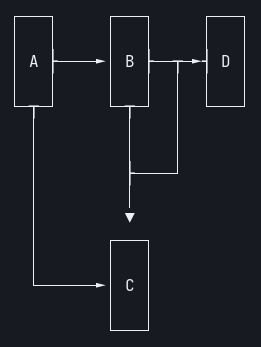
Basic flowcharts are character-for-character identical
graph LR
A --> B & C
B --> C & D
D --> C
Both tools print exactly this (trailing whitespace aside). These are real
terminal captures (asciinema + agg against an actual PTY), not a
browser's approximation of one — see "How this was checked" for why that
distinction matters for the sections below with wide characters.
| mermaid-ascii | zombie-mermaid |
|---|---|
 |
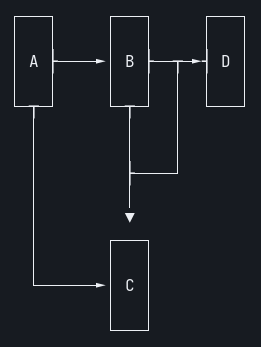 |
Same box style, same -x/-y/-p spacing flags with the same defaults,
same edge routing. If your existing diagrams are simple flowcharts, expect
them to look the same.
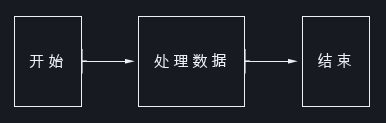
Flowchart CJK labels work in both
mermaid-ascii's PR #49
("Fix graph diagram CJK/Unicode character rendering") is still open and
conflicting, which makes it look like wide characters are broken in
flowcharts. They aren't, in 1.5.0: the fix landed separately in March 2026
(ee20c36, "preserve graph label widths for wide runes"), and the PR was
simply never closed.
flowchart LR
  A["开始"] --> B["处理数据"] --> C["结束"]
Both tools, captured from a real terminal:
| mermaid-ascii | zombie-mermaid |
|---|---|
 |
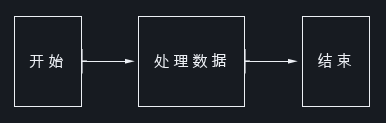 |
Bare CJK node IDs (开始 --> 结束, no brackets) also render correctly in
both. zombie-mermaid had its own bug there until 1.7.0
(#328).
Multi-line labels work in both
Likewise PR #47
(multi-line labels via <br/>) is open and conflicting, but the feature
shipped through 6ab2af2 in March 2026.
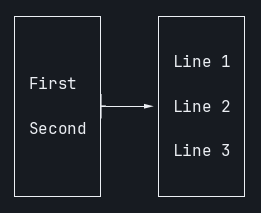
flowchart LR
  A["First<br/>Second"] --> B["Line 1<br>Line 2<br>Line 3"]
mermaid-ascii 1.5.0 puts a blank row between each line; zombie-mermaid keeps them adjacent. Both captured from a real terminal:
| mermaid-ascii (blank row between lines) | zombie-mermaid (adjacent lines) |
|---|---|
 |
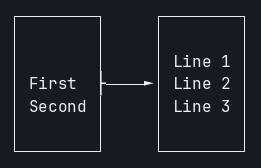 |
That is a spacing preference, not a capability gap.
Sequence-diagram fragments work in both
Their #68
(alt/else/opt/loop/par/critical/break/rect all failing to
parse) is still open, but 1.5.0 renders every one of those as a labelled
frame. Not a differentiator.
Where they differ
Sequence diagrams with wide characters
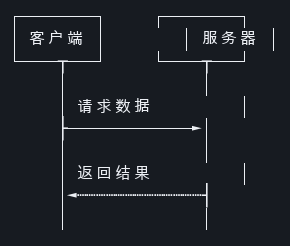
This is the one to check first if your diagrams contain CJK text. mermaid-ascii's README lists "Unicode support (emojis, CJK characters, etc.)" under sequence diagrams, and the characters do come out intact. But the layout measures them as one column each, and a CJK character occupies two, so every line that contains one is pushed right.
sequenceDiagram
  participant 客户端
  participant 服务器
  客户端->>服务器: 请求数据
  服务器-->>客户端: 返回结果
A plain-text code block can't actually show this bug — a proportional or
approximated rendering can hide exactly the column-drift that's being
claimed here — so both sides below are real terminal captures
(asciinema + agg against a genuine PTY), not a browser mockup. Look at
where the right-hand box and the arrowheads land relative to the left
column:
| mermaid-ascii (drifts right) | zombie-mermaid (stays aligned) |
|---|---|
 |
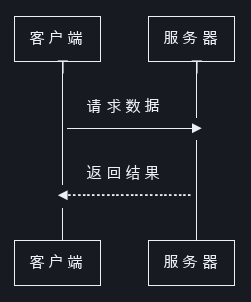 |
Measured by display width (East Asian Wide characters counted as two columns), mermaid-ascii's lines come out at 25, 28, 25, 21, 25, 21, 21, 25, 21, 21 columns; zombie-mermaid's lifeline rows are all 20 and its box rows all 24. The same thing happens with Japanese participant names and with a Latin diagram whose message text is CJK. zombie-mermaid had exactly this bug until 1.7.0 (#334); the fix was to measure text by display width everywhere the sequence renderer sizes or positions it.
(One stylistic difference is visible above and is not a bug: zombie-mermaid repeats the participant boxes at the bottom, the way mermaid.js does.)
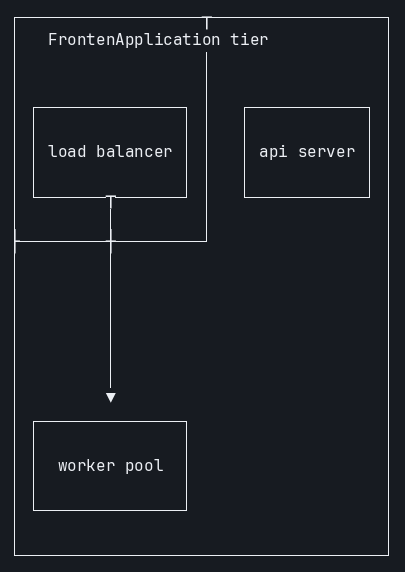
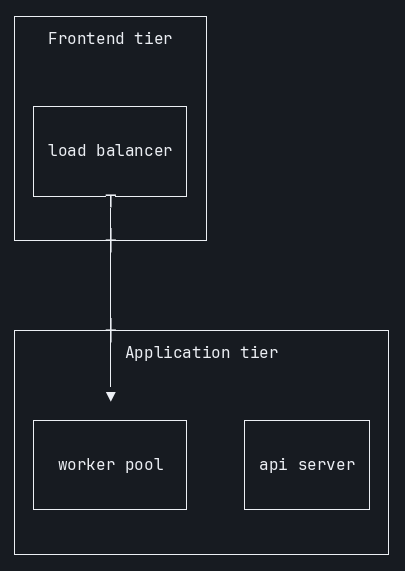
Subgraphs containing a node with no edges
Their #91,
reported against both 1.5.0 and master. Two subgraphs, one edge between
them, and one node (b2) that nothing connects to.
flowchart TB
  subgraph a["Frontend tier"]
    a1["load balancer"]
  end
  subgraph b["Application tier"]
    b1["worker pool"]
    b2["api server"]
  end
  a1 --> b1
mermaid-ascii 1.5.0 merges the two frames, overwrites one title with the
other ("FrontenApplication tier"), and draws worker pool in the frontend
column. Real terminal captures:
| mermaid-ascii (frames merged, title overwritten) | zombie-mermaid (two clean frames) |
|---|---|
 |
 |
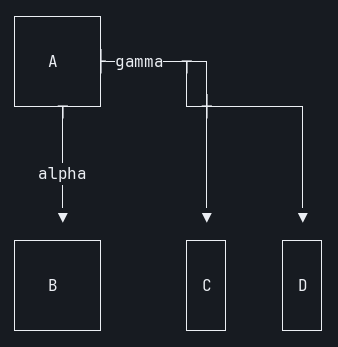
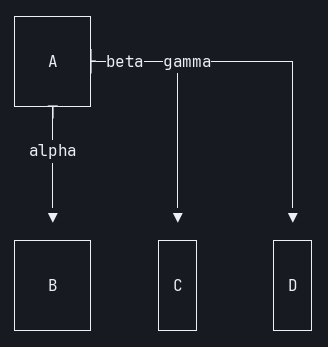
Three labelled edges out of one node, top-down
Their #70: in
TB layout the middle label disappears. The edge is drawn, the label isn't.
flowchart TB
    A -->|alpha| B
    A -->|beta| C
    A -->|gamma| D
mermaid-ascii 1.5.0 drops beta; zombie-mermaid keeps all three (beta
and gamma share the horizontal run out of A, which is cramped but
complete). Real terminal captures:
mermaid-ascii (no beta) |
zombie-mermaid (all three labels) |
|---|---|
 |
 |
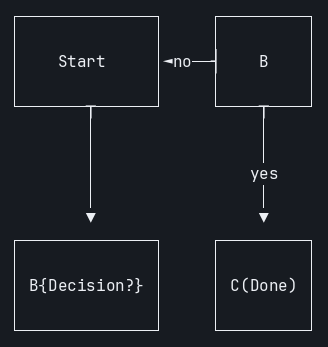
Node shapes, and labels that aren't IDs
mermaid-ascii's README lists "Shapes other than rectangles" as unsupported,
and their #46
tracks the consequence: B{Decision?} is parsed as a node whose ID is the
literal string B{Decision?}, so a later reference to B creates a second
node. Square-bracket labels were fixed; braces and parentheses were not, per
a later comment on that issue, and 1.5.0 behaves the same way.
graph TD
    A["Start"] --> B{Decision?}
    B -->|yes| C(Done)
    B -->|no| A
mermaid-ascii 1.5.0 renders four nodes for a three-node graph, with the
brace and parenthesis syntax printed verbatim (B{Decision?}, C(Done)).
zombie-mermaid renders three nodes, with the diamond and the rounded box
marked as such. Real terminal captures:
mermaid-ascii (four nodes, literal {}/()) |
zombie-mermaid (three nodes, real shapes) |
|---|---|
 |
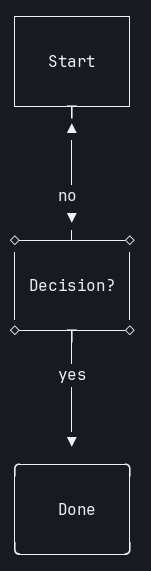 |
Diagram types beyond flowchart, sequence and ER
mermaid-ascii supports graphs/flowcharts, sequence diagrams, and ER diagrams. Anything else is a hard error:
level=fatal msg="failed to parse graph diagram: unsupported graph type 'stateDiagram-v2'. Supported types: 'graph' or 'flowchart' with an optional direction (TD, TB, BT, LR, RL)"That is their #61,
still open. classDiagram fails the same way. zombie-mermaid renders
stateDiagram-v2, classDiagram, and xychart-beta in ASCII, in addition
to the three both tools share:
stateDiagram-v2
    [*] --> Idle
    Idle --> Running : start
    Running --> Idle : stop
    Running --> [*]
zombie-mermaid, captured from a real terminal (mermaid-ascii can't render this diagram type at all, per the error above):

Fitting a terminal width
mermaid-ascii has "Prevent rendering more than X characters wide" on its
TODO list, and PR #47 proposed a -w/--maxWidth flag that never merged;
1.5.0 rejects -w as an unknown flag. zombie-mermaid has -w/--max-width <n|auto>: if the output at the requested spacing is wider than the limit,
it retries with compact spacing (-x 1 -y 1 -p 0) and tells you on stderr.
flowchart LR
  A[Parse] --> B[Layout] --> C[Route edges] --> D[Draw boxes] --> E[Draw edges] --> F[Print]
zombie-mermaid render chain.mmd --ascii --max-width 70, captured from a
real terminal:

auto reads the terminal's width. Be clear about the limit, though: compact
spacing is the only strategy. If the diagram still doesn't fit (this one is
64 columns at its narrowest, so --max-width 40 cannot succeed), you get the
compact rendering plus a warning, not wrapped labels or a flipped direction.
That is tracked in
#335.
SVG output and themes from the same source
This isn't a comparison so much as a category difference: mermaid-ascii is an ASCII renderer, and zombie-mermaid is an SVG renderer that also does ASCII. The same file that produced any of the text above can produce an SVG:
zombie-mermaid render diagram.mmd --svg -o diagram.svg --theme tokyo-night
zombie-mermaid themes   # lists the built-in themes
There's also an MCP server (zombie-mermaid mcp) exposing the same render
calls to an agent, and a local web UI (zombie-mermaid web), which
mermaid-ascii also has.
Where mermaid-ascii is better, or just as good
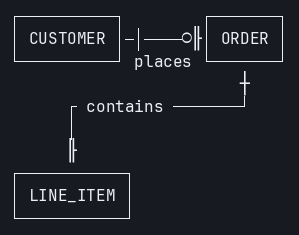
ER diagrams. mermaid-ascii's ER renderer (added in July 2026) draws crow's-foot cardinality tokens and gives every relationship its own routing lane so labels never collide. For the same two-relationship schema, its output is easier to read than zombie-mermaid's:
erDiagram
    CUSTOMER ||--o{ ORDER : places
    ORDER ||--|{ LINE_ITEM : contains
Real terminal captures, for the same two claims above:
mermaid-ascii zombie-mermaid 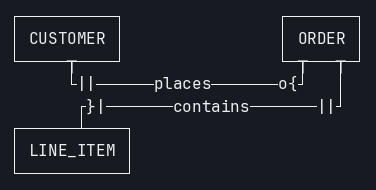
A plain-ASCII charset switch on the CLI.
mermaid-ascii --asciiswaps box-drawing characters for+,-,|and>. zombie-mermaid exposes that only through the library (renderMermaidASCII(src, { useAscii: true })); the CLI's--asciiflag means "print the terminal rendering", not "restrict to 7-bit ASCII".A single static binary. mermaid-ascii is one file with no runtime.
npx zombie-mermaidneeds Node.js and downloads the package on first run.Everything both tools share renders about the same. Flowcharts, labelled edges,
A & Bfan-out, sequence messages, notes,autonumber, fragments: the defaults match closely enough that a side-by-side is mostly a diff of whitespace.
Trying it
npx zombie-mermaid render diagram.mmd --ascii
cat diagram.mmd | npx zombie-mermaid render --ascii --max-width auto
If a diagram renders worse in zombie-mermaid than in mermaid-ascii, that's a
bug here, and a
minimal .mmd in an issue
is the fastest way to get it fixed. The two ER outputs above are already
that kind of report against ourselves.